

DIO-TOOLS-David1327 Features
Here you will find detailed descriptions of the features of DIO-TOOLS-David1327.
Dio-tools is a small extension for the browser game Grepolis. It offers, among other things, several displays (Bireme counter, unit strength...), a smiley selection box for text input fields, trade options, and a few layout modifications. Almost every feature can be disabled in the settings.
By opening the "DIO-TOOLS-David1327" settings page, accessed via the settings button  on the right sidebar of the main game screen, you can see 9 different
tabs, each providing several modules that can be enabled or disabled according to your
needs.
Features Summary
- Culture Overview (Administrator)
- Advancement of Culture (Administrator)
- Points of Culture (Administrator)
- Caves Overview (Administrator)
- Trade -> Resource Counter (Administrator)
- Overview of peasant villages (Captain)
- Culture Overview Filtering (Administrator)
- Buildings Overview Filtering (Administrator)
Units
Units Overview & Ocean Number 🔗

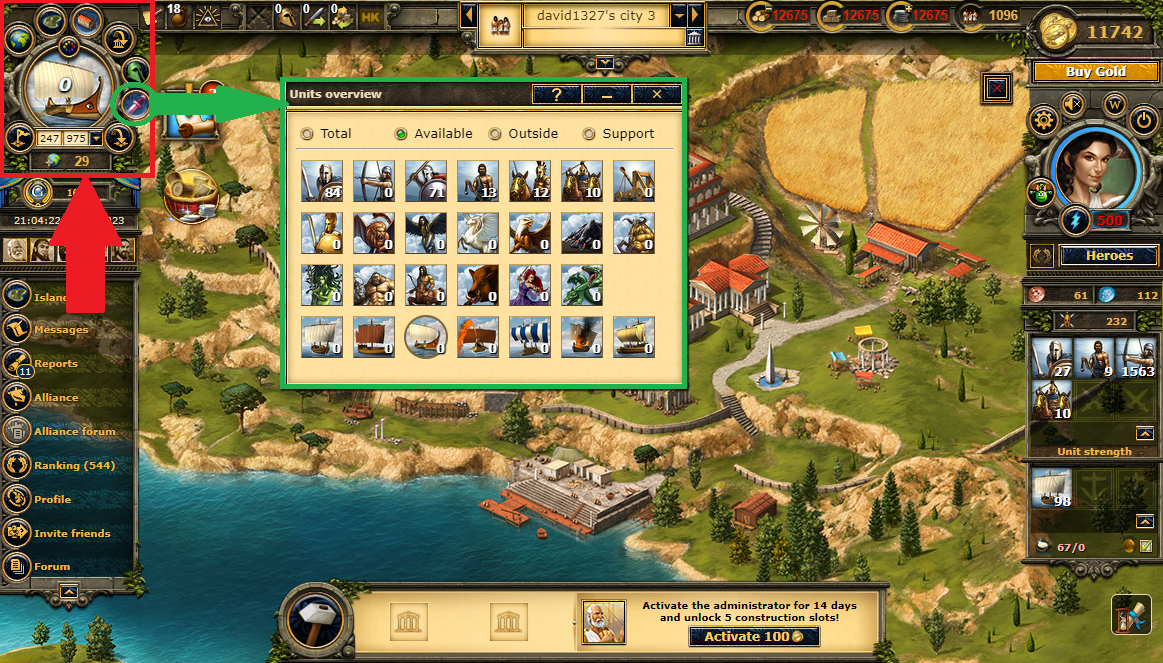
Units Overview
Ocean Number
Displays the units of all cities directly on the interface.
This function displays a visual and interactive summary of units directly on the main interface, allowing you to track the status of your troops at a glance.
- Live Unit Counter: Integrates a circular widget in the center of the minimap showing the number of units selected for the active city or the entire group.
- Detailed Management Window: Accessible with a click on the widget or via the dedicated button, it lets you choose which units to display in real-time.
- Category Filters: Provides a complete menu to instantly switch between different views:

- Total: All units present in your cities,
- Available: Units present in your cities (excluding outgoing support),
- Outer: Units currently sent as support to other players,
- Support: Support units received from other players in your cities.
- Group Management: Fully compatible with city group sorting and selection from the Administrator.
Sent Units 🔗

Sent Units
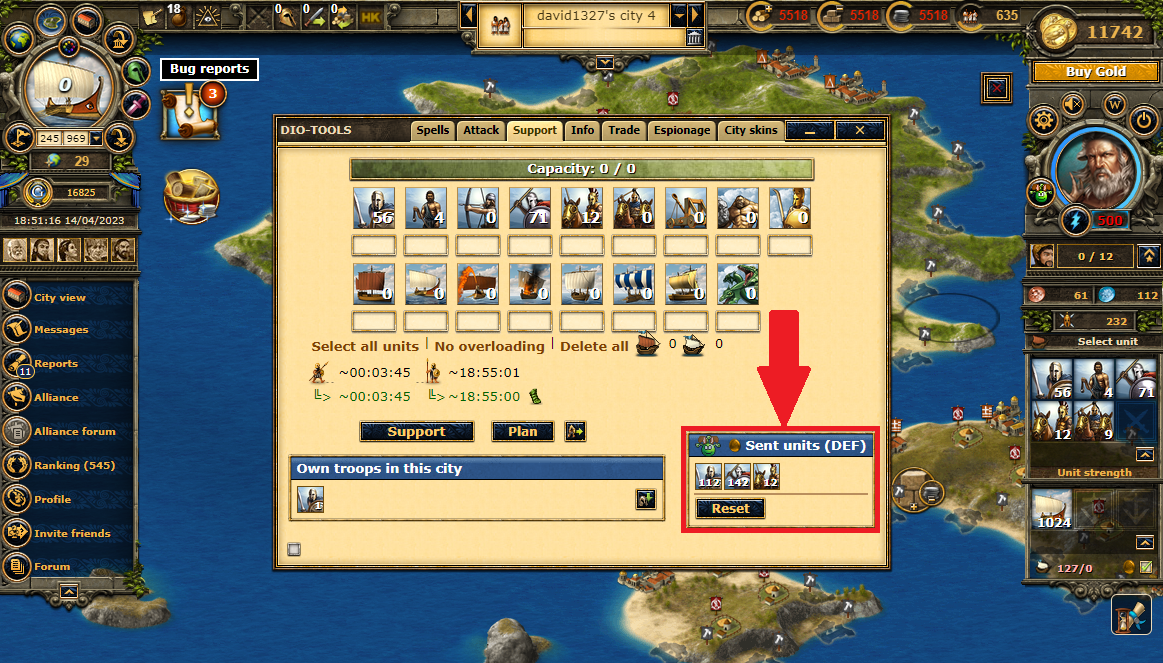
Shows sent units in the attack/support window
This function displays a cumulative summary of the units you send in attack or support directly within the troop dispatch window.
- Cumulative Tracking of Dispatches: Subscribes to troop departure events to automatically count units (land, naval, or mythical) committed to attack or defense.
- Integrated Summary Box: Adds a styled box in the attack/support window showing the exact icons and quantities of troops sent, eliminating the need for manual calculations or checking every report.
- Quick Reset: Integrates a reset button to clear the counter and start a new tactical tracking session at any time.
Unit Strength 🔗

Unit Strength
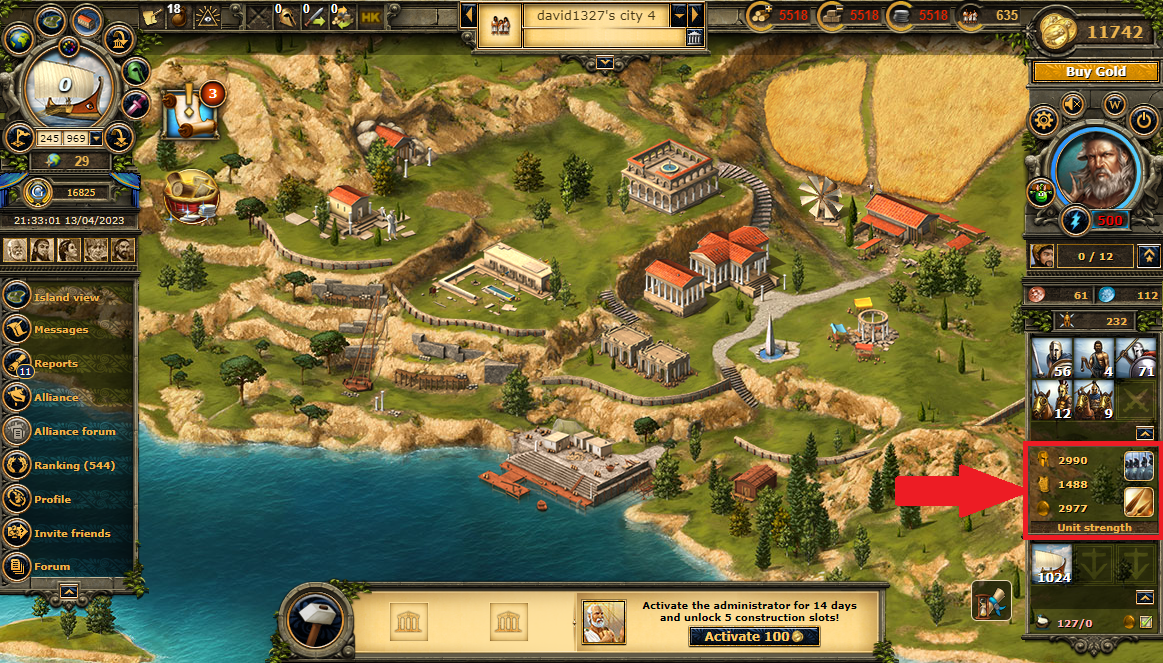
Adds unit strength tables in various areas
This function integrates unit strength analysis tables directly into various game interfaces (unit menu, barracks, conquest/siege window, etc.) to instantly assess the offensive or defensive power of your troops.
- Offensive and Defensive Strength Calculation: Allows switching between defense strength (by damage type: blunt, sharp, distance) and the city’s overall attack strength.
- Multi-window Integration: Displays dedicated boxes in the unit side menu, the barracks troop overview, and for ongoing siege troops during conquest.
- Population Tracking: Calculates and displays the total population space occupied by the city’s units directly inside the barracks.
Transport Capacity 🔗

Transport Capacity
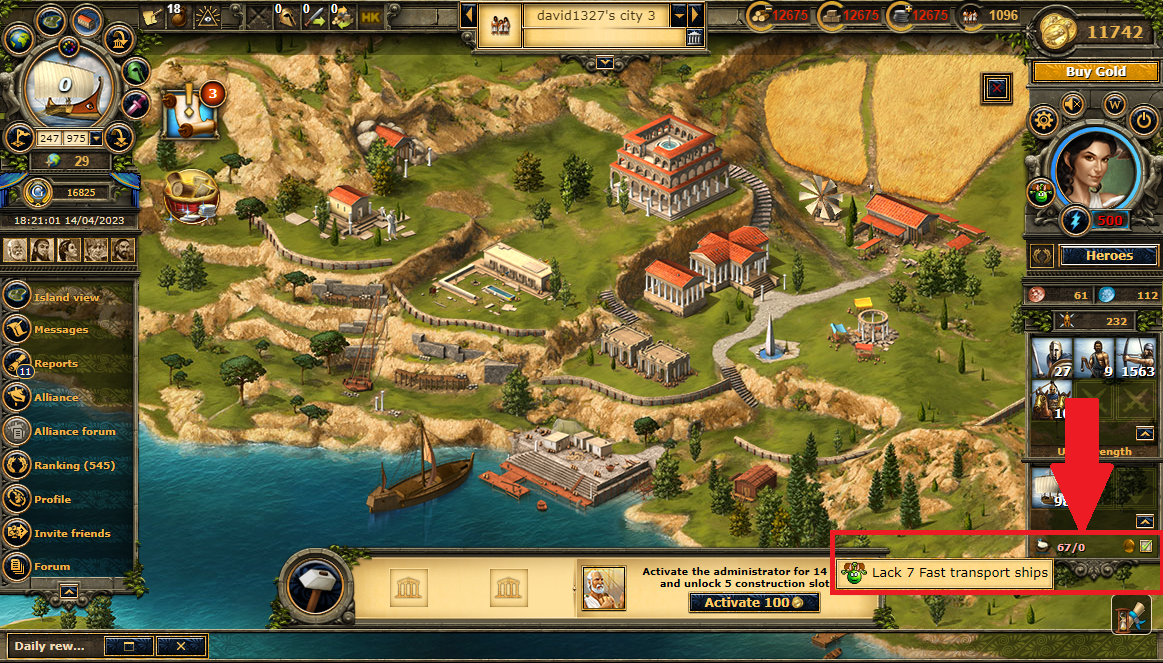
Shows the occupied and available transport capacity in the unit menu
This function integrates a transport capacity calculation module directly into the naval unit menu, allowing you to instantly compare your troop population with your transport ship capacity.
- Real-time Calculation (Population / Capacity): Displays the ratio between the population space required by your land units and the transport capacity provided by your ships (small and large transporters, taking the Berth research into account).
- Dynamic Color Indicator: The value displays in green if transport capacity is sufficient and turns red (with an indication of the missing number of ships in a tooltip) if transports are lacking.
- Interactive Options:
- A toggle button allows including or excluding units currently being recruited in the barracks/port.
- Clicking on the ship icon toggles between accounting for small transporters or large transporters.
Unit Comparison 🔗

Unit Comparison
Adds unit comparison tables.
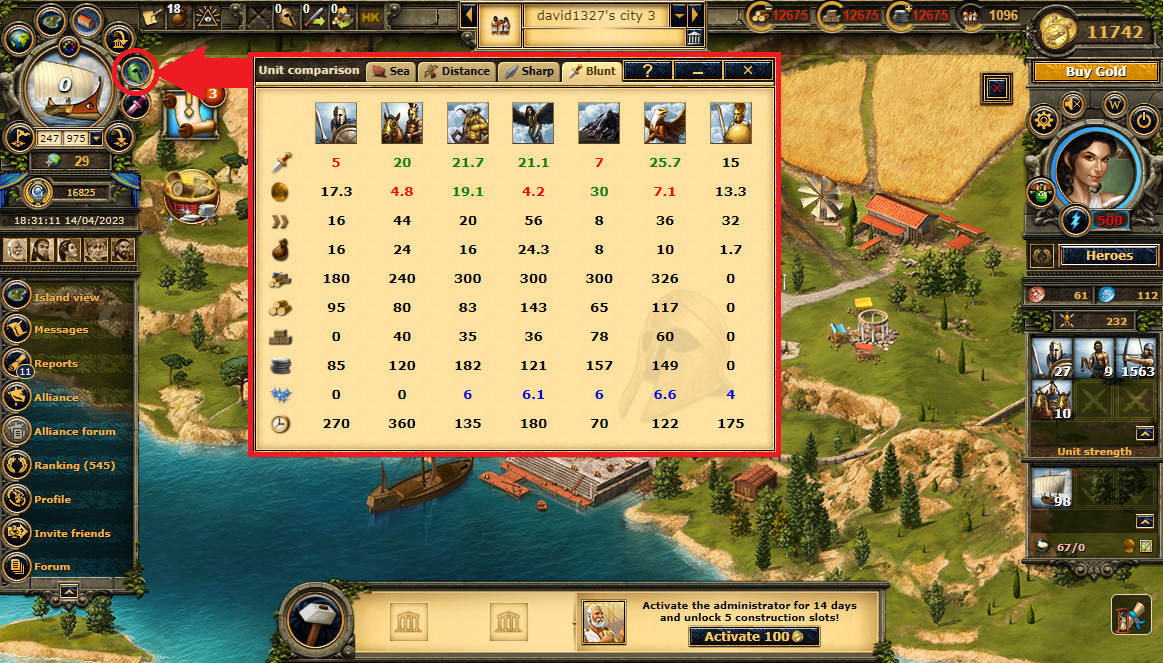
This function integrates a comprehensive comparison table of all game units, allowing you to analyze and contrast their statistics in a single place.
- Quick Access from Interface: Adds a dedicated green helmet-shaped button on the minimap (just below the button to access the current city) to instantly open the comparison window.
- Combat Type Tabs: Allows filtering and switching between different unit categories:
- Naval Units (Sea)
- Distance Units
- Piercing Units (Sharp)
- Blunt Units (Blunt)
- Detailed Technical Data: Compares attack strength, average defense, speed, booty (or transport capacity), resource costs (wood, stone, silver), divine favor cost, and recruitment time for each unit.


Removal of the unit tooltips 🔗
Removal of the unit tooltips
This function disables intrusive tooltips on unit icons across various game windows to streamline navigation.
- Hover Event Removal: Cleanly disables hover triggers on targeted unit elements.
- Window Type Management: Adapts its target based on the specified context (attack windows with
.unit_icon40x40, walls with.unit_icon50x50, barracks and docks with.thin_frame, or universal selector by default).
Town
Town icons & Automatic detection 🔗

Town icons
Automatic detection
Each city receives an icon for the town type (automatic detection)
| Land Off | Mythical Off Units | Naval Off | Outside |
| Land Def | Mythical Def Units | Naval Def | Empty |
This function improves management interface by displaying a custom icon next to each city name to instantly identify its specialization or tactical orientation.
- Automatic Detection and Classification: Automatically analyzes the city’s unit composition to assign a suitable icon (Land Offensive, Land Defensive, Naval Offensive, Naval Defense, Mythical Units, Troops Outside, or Empty City).
- Manual Selection and Large Icon Catalog: An interactive context menu accessible via click allows choosing and manually assigning a wide range of thematic icons (resources, favor, specific units, buildings, etc.).
- Layout Optimization: Realigns the Town list to the left and synchronizes icon display both in the main interface and directly on the world map.
Town list 🔗

Town list
Adds the town icons to the town list
This function significantly enhances the Town list dropdown menu by building directly upon the city icon system while adding strategic indicators to speed up your daily management.
- City Icons Display: Directly integrates the assigned specialization icon in front of each city name (via automatic detection or manual selection), allowing you to identify the role of your cities at a glance.
- Available Population Indicator: Displays the percentage of free population to the right of each city with an intuitive color code based on the remaining threshold (green for ≥ 75%, yellow/gold between 50% and 74%, dark red between 25% and 49%, and bright red below 25%).
- Detailed Hover Tooltip: Hovering over a city name in the list (for 0.5 seconds) opens a quick preview window displaying troops and key city information without switching cities.
- Optimized Ergonomics: Realigns text to the left and adjusts the placement of island quest icons and centering buttons for smooth, overlap-free reading.
Map & Popup Icons 🔗

Map
Popup Icons
Sets city icons on the strategic map
Units | Support | Heroes | Resources |
This function enhances the strategic map and island view by customizing city display and introducing interactive and detailed popups on hover.
- Map Icon Customization: Replaces standard markers with city specialization icons on the world map and minimap, featuring distinctive outlines and hover visual effects (brightness, zoom, night mode).
- Contextual Hover Popup:
Instantly displays a complete information panel when the cursor hovers over a city on the map or list:
- Name and Groups: Reminder of the city name and its associated city group(s) (via the Curator).
- Troop Movements: Real-time counter of incoming attacks and reinforcements en route.
- Units and Walls: Detailed overview of troops present in the city and current wall level.
- Support Units: Tracking of allied troops stationed as reinforcement.
- Resources and Favor: Status of wood, stone, iron, free population, divine favor (and Ares’ rage) stocks with visual alerts when storage is full.
- Strategic Data: Spy cave level, assigned hero with level, and worshiped deity.
- Independent Modular Options: Allows enabling or disabling the display of each information module in the popup individually (Units, Support, Heroes, Resources).
Town BBCode 🔗
Town BBCode
Adds town bbcode to the town tab. Quack function
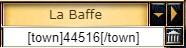
This function (Quack function) adds a direct shortcut in the city name area to generate and instantly copy the BB code of the active city.
- Quick BBCode Generation: Integrates a clickable button adorned with the Grepolis logo near the city name to display the input field containing the dedicated tag (
[town]CITY_ID[/town]). - Direct Clipboard Copy: A contextual copy button (with tooltip) allows copying the generated code in a single click, ready to be pasted on the alliance forum or in messages.
- Auto-Selection: The text field is automatically selected upon click or focus to ease manual copying if needed.
List of cities in BB-Code 🔗
List of cities in BB-Code
Copy & paste. Quack function
This function (Quack function) adds an export button directly inside the city groups dropdown menu to convert and copy your entire list of cities in BBCode format, ready to be shared on the alliance forum or via message.
- Structured BBCode Table Generation: Automatically creates a formatted table containing the city number, its clickable link (
[town]...[/town]), its points, and its ocean. - City Groups Support (Curator): Allows exporting either all your cities or only those of a specific group, mentioning the group name and total counter in the header.
- Automatic Splitting by Batches of 60 Cities: To bypass character and tag (
[) limits imposed by Grepolis messages and forum, the list is automatically split into separate blocks (1/2,2/2, etc.) as soon as you exceed 60 cities. - Quick One-Click Copy: Each generated block has its own dedicated copy button to instantly transfer the code to your clipboard.
Heroes 🔗

Heroes
Adds heroes to the city list
This function enhances the city list dropdown menu by directly displaying the heroes assigned to each of your cities, allowing you to view their distribution at a glance.
- Direct Display in City List: Adds the official miniature icon of the assigned hero next to the corresponding city name, accompanied by its current level overlay.
- Detailed Hover Tooltip: Hovering over a hero icon opens a complete popup window displaying their enlarged portrait, name, category (war or wisdom), and exact level.
- Compatibility and Ergonomics: Automatically hides any duplicate icons generated by other scripts (like GRCRT) to maintain a clean, clear, and overlap-free interface.
Forum
Smileys 🔗

Smileys
Extends the bbcode bar by a smiley box


This function integrates an emoticon selection box directly into the BBCode toolbar for all text input fields in the game (alliance forum, messages, and notepad).
- Seamless BBCode Integration: Adds a dedicated smiley-themed button in the text toolbar to open an emoticon popup window.
- Large Thematic Library: Grants access to a vast collection of emoticons from GreenSmilies as well as exclusive Grepolis-themed smileys (categorized by standard, nature, people, parties, love, Halloween, Christmas, letters, and numbers).
-
Automatic Insertion: A single click on a smiley instantly inserts its formatted image tag (
[img]...[/img]) at the exact location of your cursor in the text area. - Smileys are also available in the official forum.
- Simply drag and drop the smiley to insert it at the text area location.
Defense Form 🔗

Defense Form
Extends the bbcode bar by an automatic defense form

This function adds a dedicated button for automatic defense forms inside the BBCode toolbar, allowing you to quickly generate a complete and structured city report for your reinforcement requests on the alliance forum or via message.
- Automatic BBCode Form Generation: Instantly inserts a formatted template containing key information of the active city (city link, player name, wall level, tower, etc.).
- Optional Customization Settings via Selection Panel:
- Detailed Units: Allows including the complete list of present land and naval troops, or displaying an automatically calculated global defensive sum.
- Premium Bonuses: Integrates the status of key researches (phalanx, ram), premium advisors (Commander, Captain, High Priest), and divine favor.
- Silver Amount: Displays the cave storage level.
- Troop Movements (Experimental): Automatically lists ongoing movements and attacks targeting the city with their estimated arrival times.
- Seamless Integration: Compatible with all game text editors (alliance forum, messaging, and notepads).
Select and delete several messages 🔗

Select and delete several messages
You can delete more than one messages. Quack function
This function (Quack function) improves message and discussion management on the alliance forum by adding a global checkbox to quickly select and delete multiple messages in a single click.
- Global Multiple Selection: Adds a master checkbox in the forum footer as soon as multiple messages or comments are detected.
- Batch Check / Uncheck: Clicking this box selects or deselects all message checkboxes present on the page simultaneously.
- Contextual Help: Integrates an explanatory hover tooltip to guide the user in globally marking messages for deletion.
Trade
Recruiting Trade 🔗

Recruiting Trade
Extends the trade window with a recruiting trade

This function significantly extends the trade window capabilities by introducing an intelligent « Recruiting Trade » module based on unit and building resource ratios.
- Ratio Calculation by Unit or Building Type: Allows selecting a military unit, a building level (wall, cave), or festivities to automatically and proportionally distribute your resources based on their exact production cost.
- Dual Capacity Management:
- Capacity: Maximum: Calculates trade taking into account your warehouse’s current capacity and available dispatch capacity.
- Capacity: All: Exploits the entire maximum warehouse capacity.
- Percentage Selector and Horizontal Slider: Easily adjust the volume of resources to trade using a quick interactive slider.
- Visual Markings and Indicators: Integrates color-coded markers (green and red) to identify optimal ratios, stock limits, and city festival statuses at a glance.

Percentage Trade 🔗

Percentage Trade
Extends the trade window with a percentage trade
This function adds a proportional distribution button (« Percentage Trade ») directly inside the Agora or World Wonders resource exchange and delivery window.
- Automatic Proportional Distribution: Instantly analyzes your active city’s current stock of resources (wood, stone, iron) to calculate their percentage share relative to the total.
- Exchange Capacity Adjustment: Automatically distributes your maximum available transport capacity respecting these exact same proportions for each resource type.
- Smart Warehouse Limit Management: The script checks the remaining capacity of the destination warehouse (or Wonders) and automatically redistributes the surplus to other resources if any of them reaches its maximum limit, thereby preventing any waste or overflow.
- Quick Toggle: A first click applies and distributes transport percentages, while a second click instantly resets quantities to zero.
Trade resources for festivals 🔗

Trade resources for festivals
Click it and it only trades towards a festival. Quack function
This function (Quack function) improves the trade window interface by adding quick fill buttons and a precise missing resource indicator to fill your warehouses or fund your celebrations.
- Missing Resource Indicator: Displays in real time the exact volume of resources required (
►) to completely fill each type of storage in the targeted city. - Quick Transfer Buttons (Max): Integrates quick action arrows next to each resource (wood, stone, iron) to instantly adjust the quantity to transport to the maximum of your available exchange capabilities.
- Festival Optimization: Allows exchanging and routing precisely the resource volumes required to launch your festivals or city celebrations in a single click without manual calculation.
- Input Field Automation: Automatically calculates rounding and injects the optimal value directly into the corresponding trade input field.
Layout
Simulator 🔗
Simulator
Modification of the simulator presentation
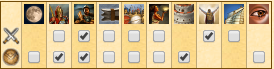
This function thoroughly transforms the Agora combat simulator interface by optimizing its layout, integrating a comprehensive power and loss calculation panel.
- Layout Optimization: Reorganizes the block arrangement (land, naval units, heroes, and gods) to reduce empty spaces and make the simulator more compact and ergonomic.
- Real-Time Unit Power Calculator: Analyzes entered units to dynamically display offensive and defensive strength by damage type (blunt, sharp, distance, and naval).
- Detailed Loss Estimation (Resources, Favor, Population): Instantly calculates the total cost of losses in resources (wood, stone, iron converted and formatted), divine favor, and population for both attacker and defender, even including the impact of wall level destructions.
- Automated Unit Strength: Automatically synchronizes unit strength for entered unit types and supports direct transfers from spy reports.
Taskbar 🔗

Taskbar
The taskbar increases
This function enlarges and centers the minimized window area at the bottom of the screen, allowing you to keep a larger number of minimized windows visible simultaneously without overlapping or hiding.
- Display Area Widening: Increases the width of the minimized windows bar to 150% of its initial size.
- Automatic Centering: Shifts the container 25% to the left to maintain a perfectly symmetrical and centered alignment in the game interface.
- Easier Multitasking: Allows much easier access to various minimized windows (reports, messages, buildings, or overviews) during intense gaming sessions.
Favor Popup 🔗

Favor Popup
Changes the favor popup
This function replaces the default top bar tooltip with a visual and comprehensive popup, displaying the status of your divine favors and fury at a glance.
- Gods Synoptic Table: Displays an interactive grid table grouping only the gods you worship (via your current temples), illustrated by their official mini-icons.
- Detailed Stock and Production Tracking: For each deity, the popup indicates the current amount of accumulated favor as well as the hourly production rate (
+). - Dynamic Threshold Alerts: Text changes color automatically (blue by default, or bright red) when favor or fury storage reaches maximum, thereby preventing waste.
- Fury Integration: Also adds a dedicated container to precisely track current fury status relative to the maximum allowed.
Context Menu 🔗

Context Menu
Swaps "Select town" and "City overview" in the context menu
This function reorganizes and optimizes the behavior of the context menu displayed when clicking a city on the map, reversing the layout of main actions for faster access.
- Action Buttons Reversal: Swaps the positions of the « Select Town » and « Town Overview » buttons to place the primary action directly under the cursor.
- Custom Animation: Applies a smooth and instantaneous transition when opening the context menu for a more responsive display.
Scrollbar 🔗

Scrollbar
Change the style of the scrollbar (Not available on firefox)
Blue | Red | Green | Pink | White |
This function customizes the visual appearance of horizontal and vertical scrollbars across the entire game interface (compatible with WebKit/Blink-based browsers such as Chrome, Opera, Edge, and Safari; not available on Firefox).
- 5 Color Themes to Choose From: Allows instantly applying your desired hue via parameter radio buttons: Blue (default), Red, Green, Pink, or White.
- Complete Component Styling: Customizes the entire scrollbar (translucent background track, slider with hover accent effect) as well as directional arrows (up, down, left, right) matching the selected theme.
- Dynamic Application: Color changes apply in real-time across all windows and dropdown lists of the game without requiring a reload.
Activity Box 🔗

Activity Box
Improved trade and recruitment presentation (position memory)
This function improves the game’s activity dropdown lists (orders, recruitments, trades, and temple orders) by introducing scroll bars and interactive position memorization.
- Detachable and Movable Windows: Adds a drag handle to the top bar activity lists, allowing you to move them freely across the screen according to your interface preferences.
- Position Memory: Remembers the custom coordinates where you placed each activity box.
- Quick Reset Buttons: Integrates a close/return button to instantly reposition or hide windows, with the ability to double-click on toolbar icons to reset their display.
- List Optimization: Improves the display behavior of troop movements, recruitment queues, and trade exchanges for better ergonomic fluidity.
City View 🔗
City View
City view construction mode is selected by default
This function automates the urban view display by switching directly to construction mode upon opening the city, saving you from manually clicking the button on every transition.
- Automatic Construction Mode Activation: Detects city view opening and instantly simulates a click on the construction button if the mode is not already active.
- Layout Event Listener: Subscribes to Grepolis interface events (compatible with various game versions) to smoothly reapply construction mode during view changes.
- Daily Time Saver: Allows chaining management, construction, and building upgrades much more smoothly and rapidly.
Offensive
Troop Speed 🔗
Troop Speed
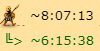
Displays improved troop speed in the attack/support window
This function enhances the attack and support dispatch window by dynamically displaying additional time information, notably travel time with acceleration bonus and specific calculations related to divine powers.
- Accelerated Travel Time: Calculates and displays in real time the duration and estimated arrival time of troops, taking speed acceleration bonuses into account (as well as the impact of hero Atalanta’s level if included in the expedition).
- Hades’ Power Handling (Cape of Invisibility): For attack windows, a specific calculation also indicates the reduced/impacted duration and arrival time resulting from the use of Hades’ invisibility spell.
- Real-Time Update: The script monitors troop and hero selection changes to instantly refresh duration counters and arrival times.
Conquest 🔗
Conquest
Counts the attacks/supports in the conquest window
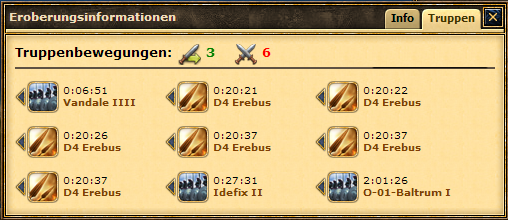
This function improves the conquest and revolt window interface by adding a global and instant counter of ongoing troop movements (attacks and supports).
- Automatic Movement Counting: Analyzes the movement list in the dedicated window in real time to enumerate supports on one side and attacks on the other (whether land, naval, or take-over).
- Sleek Visual Display: Integrates a compact counter in the center of the window, accompanied by the game’s official defense and attack icons for immediate situation reading.
- Interface Optimization: Also adjusts troop movement layout to make the display more condensed and readable during large-scale conquest operations.
Add (No overloading / Delete) 🔗

Add (No overloading / Delete)
Improvement of new tools on the attack and support window. Quack function
This function (Quack function) adds new ergonomic assistance buttons directly inside the attack and support dispatch window to facilitate rapid troop selection or resetting.
- “Without Overload” Option: Allows automatically distributing and selecting land units to precisely optimize available transport capacity (based on small transports, large transports, and berth researches), thereby avoiding unnecessary waste or vessel overloading.
- “Clear” Option: Adds a global deletion shortcut to instantly empty all troop input fields in a single click.
- Interface Optimization: Reorganizes selection elements to cleanly integrate these new tools alongside the game’s native buttons.
Misc
Mouse Wheel 🔗

Mouse Wheel
You can change the views with the mouse wheel
This function allows navigating quickly between different game views (city view, island view, and strategic map) simply using your mouse wheel, while adding a direct shortcut to the Agora.
- Smooth Scroll Navigation: Scrolling the mouse wheel up or down automatically switches smoothly from one view to another (City View / Island View / Strategic Map).
- Agora Shortcut: Adds a clickable area at the combat points container level to instantly open the Agora window with a single click.
- Parasitic Scrolling Prevention: Intercepts wheel events on main view areas to prevent unwanted zooming or scrolling of the browser web page.
BBcode button Player Info 🔗

BBcode button Player Info
Addition of a BBcode button (player and alliance)
This function adds BBCode generation buttons directly inside player and alliance information windows, facilitating the sharing of profiles and diplomatic links.
- Dedicated BBCode Buttons: Integrates clickable icons alongside player names (
[player]...[/player]) and alliance names ([ally]...[/ally]) in preview and information windows. - Input Field and Quick Copy: Clicking the button displays a field containing the formatted BBCode and activates a one-click copy-to-clipboard button.
- Auto-Selection: BBCode text is automatically selected upon focus or click to simplify manual handling if needed.
BBcode List 🔗

BBcode List
Generates a list in BB-code, ideal for displaying alliance members or a player's cities
This function automatically generates complete lists in BBCode format (structured tables) to easily export strategic data directly from the game’s information windows.
- Multiple and Targeted Export: Allows generating lists in BBCode format for three different view types:
- Player’s Cities: Lists all of a player’s cities with their links, points, and oceans.
- Alliance Members: Enumerates alliance members with their scores and number of cities owned.
- Island Information: Censuses cities present on an island with their respective owners and alliances.
- Automatic Splitting by Batches of 60 Items: Intelligently divides overly long lists into multiple blocks to comply with character and tag limits of the game and forum.
- Integrated Quick Copy: Each text block features its own dedicated copy button for immediate transfer to the clipboard.
Group Message (Alliance) 🔗

Group Message (Alliance)
Adds a button on the alliance profile to facilitate sending group messages
This function adds a group messaging button directly onto the alliance profile, allowing you to contact all its members in a single click.
- Dedicated Group Dispatch Button: Integrates an official mass message icon into the member list header or alliance profile.
- Automatic Recipient Extraction: Iterates through active member lists to automatically retrieve all their pseudonyms and inject them into a new collective message.
- Instant Messaging Opening: Directly opens the game’s message composition window prefilled with all recipients separated by semicolons, greatly facilitating diplomatic or military communication.
Daily Rewards 🔗
Daily Rewards
Minimizes the daily reward window on startup
This function automatically minimizes the daily rewards window upon logging into the game, immediately clearing your view of the interface without requiring manual closure.
- Automatic Startup Minimization: Monitors the appearance of the daily login window during initial game loading and simulates a click on its minimize button.
- Preserved Access: The window is not closed but simply minimized into the minimized windows bar at the bottom of the screen, allowing you to claim your daily bonus whenever you wish.
- Lightweight and Optimized Execution: Uses a DOM observer that automatically deactivates once the window has been minimized (or after 5 seconds) to ensure zero impact on browser performance.
Hide World End Window 🔗
Hide World End Window
By checking the option you will no longer see the world end window
This function permanently hides the world end information banner or window (server closure countdown), allowing you to free up screen space and enjoy a streamlined interface.
- Immediate World End Alert Hiding: Injects a dedicated CSS rule (
#world_end_info { display: none; }) that makes the world closure warning box disappear from your screen. - Visual Space Gain: Prevents this persistent notification from cluttering your map or city view during a server’s final days.
- Reversible at Any Time: Simply uncheck the option in settings to instantly make the world end counter reappear if you wish to check remaining time.
World Wonder 🔗

World Wonder
Resource counter and dispatch calculation + previous and next buttons on completed wonders
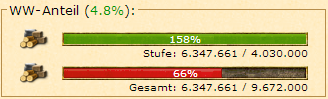
This function considerably improves the World Wonders management interface by integrating a resource calculator, contribution ratio tool, and streamlined navigation between monuments.
- Sharing and Resource Calculator: Evaluates and displays player contribution ratios relative to alliance points, while precisely calculating resource quantities stored and required for subsequent levels.
- Layout Optimization: Reorganizes wonder interface elements to make progress and trade information much more readable.
- Improved Navigation on Completed Wonders: Adds missing “Previous” and “Next” scroll buttons on already completed world wonder pages, allowing you to switch from one to another without returning to the general list.
Premium
Culture Overview (Administrator) 🔗

Culture Overview (Administrator)
Adds a counter for festivals in the culture view. Quack function
This function (Quack function) enhances the culture overview (reserved for Administrator accounts) by adding dynamic real-time counters and quick filter buttons by celebration type.
- Available Celebration Counters: Displays distinct badges for each celebration type (city festivals, Olympic games, victory processions, and theater plays) directly indicating the number of times you can start them.
- Automatic Procession and Gold Calculation: Accurately evaluates feasible victory processions using your surplus battle points and adjusts Olympic games according to your available gold reserves.
- Instant Visibility Filters: Each counter button also acts as an interactive filter. Clicking it lets you hide or display cities in one click depending on whether or not they can start the targeted celebration.
- Automatic Refresh: Periodic background refreshing keeps counters up to date as you progress in the game.
Advancement of Culture (Administrator) 🔗

Advancement of Culture (Administrator)
Modification of the progress bar presentation and addition of a progress bar for cultures. Akiway's function
This function (originally developed by Akiway) improves the culture points progress bar display in the Agora as well as in the culture overview (Administrator), making it much more accurate and informative.
- Actual Current Level Progression: Unlike the game’s default bar which displays progress since level 1, the script recalculates the exact percentage required solely to clear the current culture level.
- Ongoing Points Visualization: Adds a second distinct progress bar (in a different color) directly following your acquired points to visually represent culture points currently in production (festivals, victory processions, theater plays, Olympic Games).
- Dual Integration: The new gauge automatically replaces the standard bar both in the Agora’s Culture tab and in the Administrator’s Culture Overview, allowing you to see at a glance if your ongoing celebrations will suffice to unlock a new city slot.
Points of Culture (Administrator) 🔗
Points of Culture (Administrator)
Add a counter for culture points. Quack function
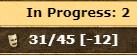
This function (Quack function) enhances the Agora as well as the Administrator’s culture overview by adding predictive counters and a precise countdown for unlocking your next city slots.
- Missing or Surplus Culture Points Calculation: Automatically sums your current culture points and those generated by ongoing festivities (festivals, victory processions, theater plays, Olympic Games) to display the remaining balance before the next level (
[-X]) or already acquired surplus (+Xin gold). - Dynamic Countdown (Administrator): In the culture overview, when ongoing festivities suffice to reach the next tier, displays a real-time timer indicating the exact time when the next culture level will unlock.
- Battle Points Tracking: Also displays the number of missing battle points (
[-X]) needed to start the next victory procession. - Automatic Refresh: Data and counters update periodically and automatically in the background without requiring window reloads.
Caves Overview (Administrator) 🔗

Caves Overview (Administrator)
Allow city sorting. Quack function
This function improves the caves overview (reserved for Administrator accounts) by automating the management and storage of silver coins in your cities.
- Automatic Storage Management: The script analyzes available silver reserves in your cities in real time via the caves overview.
- 15,000 Coins Threshold: As soon as a city’s silver stock exceeds 15,000 coins, the system automatically calculates the surplus (keeping or deducting this threshold) and fills in the cave input fields for you.
Trade -> Resource Counter (Administrator) 🔗
Trade -> Resource Counter (Administrator)
A counter of all your city's resources
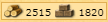
This function adds a cumulative resource counter at the top of the Administrator’s trade overview, giving you an instant overview of total stocks available across your cities.
- Real-Time Total Sum: Automatically calculates and sums the quantities of wood, stone, and silver coins present across all your listed cities.
- Sleek Integration: Fits discreetly into the search and options bar of the trade overview window with the game’s official resource icons.
- Easier Logistics Management: Allows assessing your global reserves at a glance before making goods transfers or funding major projects.
Overview of peasant villages (Captain) 🔗
Overview of peasant villages (Captain)
Automatically hide the city. Quack function
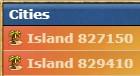
This function (Quack function) enhances the farming villages overview (accessible via the Captain) by optimizing island organization and automatically hiding superfluous cities or elements to streamline resource collection.
- Automatic Hiding and List Collapsing: Allows hiding or showing the city lists associated with each island in one click to reduce scrolling and focus solely on active islands.
- Looting Selection and Memorization: Remembers and quickly reapplies your favorite looting duration options during batch collections.
- Smooth City Navigation: Optimizes automatic scrolling to the next or previous active city when managing farming village tributes.
Culture Overview Filtering (Administrator) 🔗

Culture Overview Filtering (Administrator)
Allow city sorting
This function enhances the culture overview (reserved for Administrator accounts) by adding advanced sorting tools, a text filter by city name (with automatic suggestions), and an interactive date/time picker.
- Sorting Criteria Selector: Allows instantly sorting cities by name or based on celebration/procession end times and delays.
- Conditional Filters and Operators: Pair a comparison operator (
>or<) to refine the city display according to your temporal or numerical criteria. - Integrated Time Selector: A date and time picker allows precisely filtering cities based on culture deadlines.
- Sort Reversal: A dedicated button lets you quickly toggle between ascending and descending sort order.
- Persistence and Auto-Refresh: Display preferences are saved, and the script automatically synchronizes when you start new festivals or celebrations in your cities.
Buildings Overview Filtering (Administrator) 🔗

Buildings Overview Filtering (Administrator)
Allow city sorting
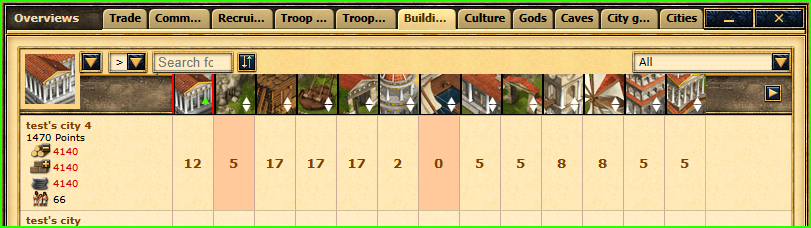
This function radically transforms the buildings overview by adding advanced sorting, numerical filtering, and city name search tools directly integrated into the game interface.
- Dynamic Sort Selector: Allows instantly choosing the sorting criterion (by building level, resources, city points, or name).
- Numerical Filters and Operators: Pair a comparison operator (
>,=,<) and a numerical value to dynamically filter your cities by building levels or resource stocks. - Smart Search: Type a city name directly (with an auto-suggestion system) to instantly isolate its information in the table.
- Sort Reversal: A dedicated button lets you quickly toggle between ascending and descending sorting for better readability.
- Data Persistence: The script remembers your sorting and display choices to maintain your preferences across sessions.
Quack
BB-Code Messages 🔗

BB-Code Messages
Convert messages to BB-Code. Quack function
This function (Quack function) allows exporting the full content of received messages directly into structured BBCode format, facilitating sharing on the alliance forum or in other messages.
- Dedicated Export Button: Adds a “BBCode messages” button directly in the header of the message list or window to launch conversion instantly.
- Smart Translation and Formatting: Automatically converts message formatting (bold, italic, quotes, spoilers, published reports, cities, and players) into game-compatible BBCode tags.
- Quick Copy and Contextual Help: Opens a dedicated window displaying the converted text ready to be copied to the clipboard in one click, with direct access to the explanatory Wiki.
Keyboard Shortcuts for Windows 🔗

Keyboard Shortcuts for Windows
It changes your life
This function integrates a comprehensive and customizable keyboard shortcut system to navigate, open windows, and manage your actions in record time in Grepolis.
- Dedicated Configuration Interface: Accessible via a button on the activity bar, it allows viewing, modifying, or resetting all keyboard shortcuts associated with various features (city navigation, main menus, Administrator and Captain overviews, buildings) in one click.
- Intuitive Customization: A simple click on the edit icon associated with an action lets you dynamically assign the key of your choice with a single keypress.
- Case Sensitivity Management: Allows enabling or disabling uppercase/lowercase sensitivity for configured shortcuts.
- Quick Contextual Overview: Hovering over the main icon displays the full list of active shortcuts sorted by category.


Visualization of the island 🔗
Visualization of the island
Increase the height of the list of cities and villages
This function optimizes the ergonomics of the island information window by enlarging the list display area and integrating a group messaging shortcut for island neighbors.
- Enlarged Lists: Increases the height of both the player cities list and the farming villages list, allowing you to view many more entries simultaneously without scrolling.
- Island Group Messaging: Adds a dedicated button in the island controls to send a collective message to all players present on the island in one click (automatically excluding yourself as well as empty slots or ghost towns).
- Layout Readjustment: Harmoniously repositions central blocks, farming village overview buttons, as well as recipient and subject fields in the message window.
Cave 🔗
Cave
Enter silver above 15000 automatically into the input field. Quack function
This function (Quack function) automates filling silver coin input fields in the cave and in the Administrator’s overview, systematically keeping a safety threshold of 15,000 coins.
- Automatic Silver Storage Management: Detects if the city’s silver coin stock exceeds 15,000 and automatically calculates the available surplus to instantly fill the storage or espionage field.
- Resource Security: Ensures that a minimum balance of 15,000 coins is always preserved in your caves to maintain your defenses against espionage below this threshold.
City View Button 🔗
City View Button
Add a button to open the city view to the Grepolis side menu. Quack function
This function (Quack function) adds a quick toggle button at the very top of Grepolis’ left side menu to switch between city view and island view in a single click.
- Direct Integration into Main Menu: Adds a new dedicated entry at the top of the side menu (just above messages), automatically adjusting menu height and alignment for native integration.
- Smart Contextual Button: The button’s icon and label dynamically adapt in real time based on your current view (displays “City View” when you are on the island or strategic map, and “Island View” when you are already inside your city).
- Multi-Script Compatibility: Automatically adapts if other extensions (such as GRCRT) also add buttons to the side menu to avoid any display conflicts.
City View 🔗
City View
Display the city in a window. Quack function
This function (Quack function) allows displaying the city view inside an independent and resizable window instead of opening it in full screen, enabling you to keep observing the map or other interfaces in the background.
- Windowed Mode for the City: Fully encapsulates the city view and its construction queue inside a dedicated window of the game’s window manager.
- Dynamic Closing Management: When you close or minimize the city window, the script automatically switches the display back to island view or strategic map depending on your last active position.
- Easier Multitasking: Allows keeping an eye on the interior of your city while interacting with the rest of the game’s interface and menus.
GRCT
Inactive Player 🔗

Inactive Player
Display inactive players. Powered by GREPODATA
This function allows identifying and displaying inactive players on the map and in game lists by leveraging external data from GREPODATA.
- GREPODATA Synchronization: Regularly queries (approximately every hour) the official GrepoData API to retrieve inactivity statistics for each world.
- Inactivity Time Tracking and Conversion: Processes and stores data per player (converted into days) within the global object to feed analytical tools and strategic spotting.
Ocean Number 🔗

Ocean Number
Integrates ocean numbers into the island view, improving navigation.
This function is not compatible with GRCT
This function displays the boundaries and numbers of seas (oceans from 00 to 99) as watermarks directly on the island view, allowing you to locate yourself instantly without having to consult the strategic map.
- Complete 100-Sea Grid: Superimposes a subtle grid (reduced to 10% opacity with light white borders) covering the entire world map (
12800 × 12800 pxper sea) with the visual display of the corresponding number. - Immediate Geographic Locating: Facilitates the identification of sea borders when moving across the map or planning operations spanning multiple sectors.
- Automatic Conflict Management: Detects if the GRCRT extension is already active on the page and automatically deactivates itself accordingly to prevent double sea number overlays.
Wall Backup 🔗

Wall Backup
Allows for the backup of troops in the walls, ensuring enhanced protection
This function is not compatible with GRCT
This function allows tracking the evolution of troops stationed on the city walls by comparing different states saved over time.
- Multiple State Saving: Allows saving up to 10 different states of the wall troops with a simple press of the save button, accompanied by a precise timestamp.
- Casualty Comparative Analysis: Offers two dropdown menus to compare the current state (via “Auto Mode”) or pit two saves against each other, displaying headcount differences for each unit type in real time.
- Management and Cleanup: Integrates a delete button to cleanly clear obsolete saves and automatically deactivates if the GRCRT script is detected to avoid any conflict.
Attack Alarm 🔗

Attack Alarm
Receive instant warnings when attacked, enhancing your security
This function is not compatible with GRCT
This function triggers a customizable audible alarm as soon as an incoming attack is detected, significantly increasing responsiveness and security against enemy offensives.
- Real-Time Detection and Alert: Subscribes to game attack events to trigger a looping audio alert upon the appearance of a new offensive.
- Aggressive Notification Refreshing: Reduces the game’s notification check interval from 5 minutes to just 10 seconds to ensure no attack goes unnoticed.
- Control and Mute: Integrates a quick deactivation button to silence the alarm in one click, while managing conflicts with third-party scripts like GRCRT.
Message coloring 🔗
Message coloring
Applies a color to messages based on their origin (alliance, enemy, pact).
This function is not compatible with GRCT
This function analyzes your alliance’s diplomatic relations in real time (pacts, wars) as well as your custom color preferences to colorize message backgrounds in your inbox.
- Dynamic Diplomatic Identification: Iterates through alliance pact collections to classify each sender according to their affiliation (own alliance, pact, enemy, or neutral).
- Contextual Color Gradient: Applies a subtle gradient background based on the color associated with the player or their alliance to quickly spot the nature of a message.
- Compatibility and Optimization: Checks if message colorization is handled by third-party scripts to prevent display conflicts in lists and detailed views.